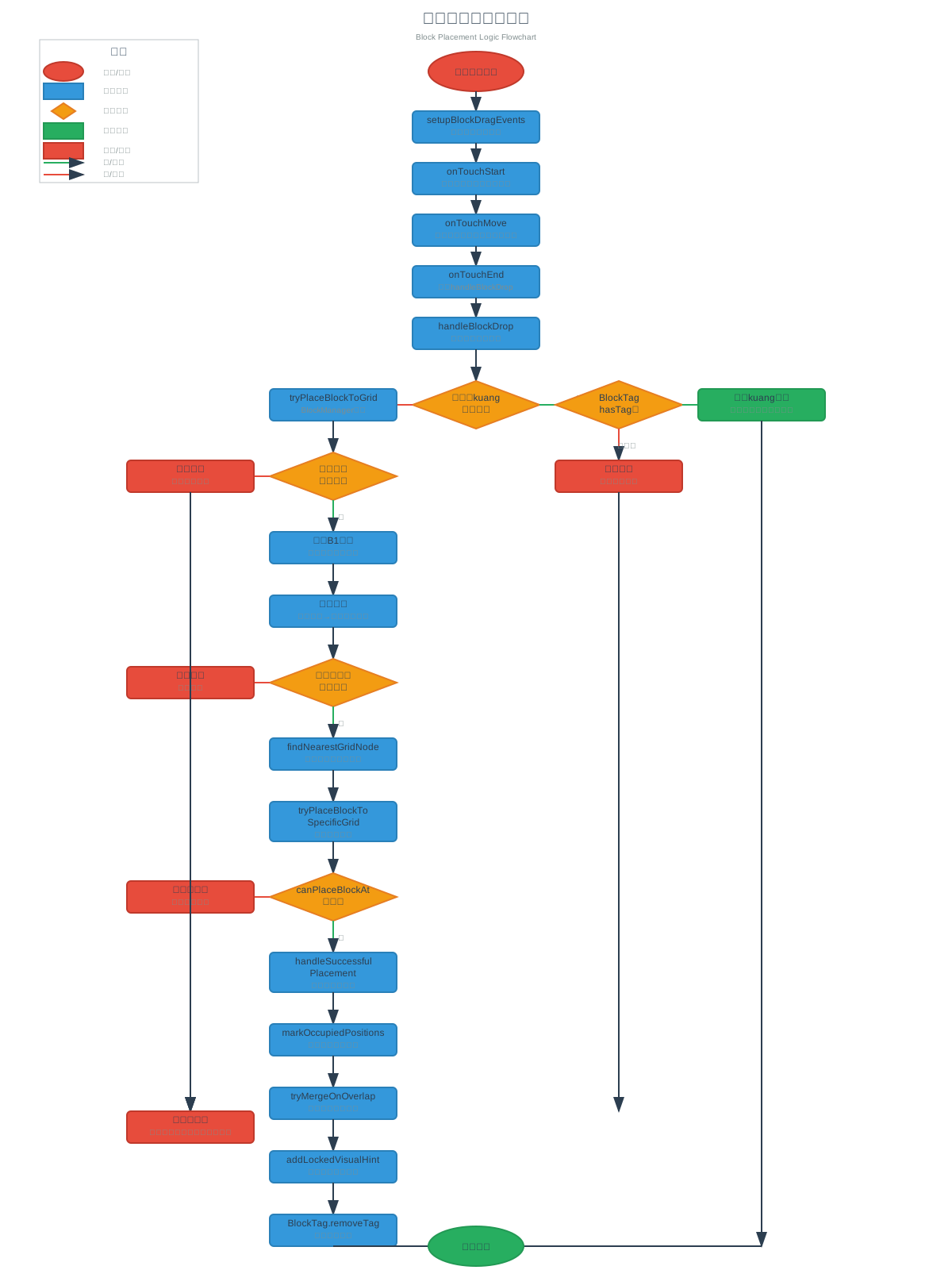
| 123456789101112131415161718192021222324252627282930313233343536373839404142434445464748495051525354555657585960616263646566676869707172737475767778798081828384858687888990919293949596979899100101102103104105106107108109110111112113114115116117118119120121122123124125126127128129130131132133134135136137138139140141142143144145146147148149150151152153154155156157158159160161162163164165166167168169170171172173174175176177178179180181182183184185186187188189190191192193194195196197198199200201202203204205206207208209210211212213214215216217218219220221222223224225226227228229230231232233234235236237238239240241242243244245246247248249250251252253254255256257258259260261262263264265266267268269270271272273274275276277278279280 |
- <svg width="1200" height="1600" xmlns="http://www.w3.org/2000/svg">
- <defs>
- <style>
- .title { font-family: Arial, sans-serif; font-size: 20px; font-weight: bold; fill: #2c3e50; }
- .subtitle { font-family: Arial, sans-serif; font-size: 14px; font-weight: bold; fill: #34495e; }
- .text { font-family: Arial, sans-serif; font-size: 12px; fill: #2c3e50; }
- .small-text { font-family: Arial, sans-serif; font-size: 10px; fill: #7f8c8d; }
- .start-end { fill: #e74c3c; stroke: #c0392b; stroke-width: 2; }
- .process { fill: #3498db; stroke: #2980b9; stroke-width: 2; }
- .decision { fill: #f39c12; stroke: #e67e22; stroke-width: 2; }
- .success { fill: #27ae60; stroke: #229954; stroke-width: 2; }
- .error { fill: #e74c3c; stroke: #c0392b; stroke-width: 2; }
- .arrow { stroke: #2c3e50; stroke-width: 2; fill: none; marker-end: url(#arrowhead); }
- .yes-arrow { stroke: #27ae60; stroke-width: 2; fill: none; marker-end: url(#arrowhead); }
- .no-arrow { stroke: #e74c3c; stroke-width: 2; fill: none; marker-end: url(#arrowhead); }
- </style>
- <marker id="arrowhead" markerWidth="10" markerHeight="7" refX="9" refY="3.5" orient="auto">
- <polygon points="0 0, 10 3.5, 0 7" fill="#2c3e50" />
- </marker>
- </defs>
-
- <!-- 标题 -->
- <text x="600" y="30" text-anchor="middle" class="title">方块放置逻辑流程图</text>
- <text x="600" y="50" text-anchor="middle" class="small-text">Block Placement Logic Flowchart</text>
-
- <!-- 开始 -->
- <ellipse cx="600" cy="90" rx="60" ry="25" class="start-end"/>
- <text x="600" y="95" text-anchor="middle" class="text">开始拖拽方块</text>
-
- <!-- 箭头1 -->
- <line x1="600" y1="115" x2="600" y2="140" class="arrow"/>
-
- <!-- 设置拖拽事件 -->
- <rect x="520" y="140" width="160" height="40" rx="5" class="process"/>
- <text x="600" y="155" text-anchor="middle" class="text">setupBlockDragEvents</text>
- <text x="600" y="170" text-anchor="middle" class="small-text">设置触摸事件监听</text>
-
- <!-- 箭头2 -->
- <line x1="600" y1="180" x2="600" y2="205" class="arrow"/>
-
- <!-- 拖拽开始 -->
- <rect x="520" y="205" width="160" height="40" rx="5" class="process"/>
- <text x="600" y="220" text-anchor="middle" class="text">onTouchStart</text>
- <text x="600" y="235" text-anchor="middle" class="small-text">记录初始位置,禁用碰撞</text>
-
- <!-- 箭头3 -->
- <line x1="600" y1="245" x2="600" y2="270" class="arrow"/>
-
- <!-- 拖拽移动 -->
- <rect x="520" y="270" width="160" height="40" rx="5" class="process"/>
- <text x="600" y="285" text-anchor="middle" class="text">onTouchMove</text>
- <text x="600" y="300" text-anchor="middle" class="small-text">更新方块位置,显示调试信息</text>
-
- <!-- 箭头4 -->
- <line x1="600" y1="310" x2="600" y2="335" class="arrow"/>
-
- <!-- 拖拽结束 -->
- <rect x="520" y="335" width="160" height="40" rx="5" class="process"/>
- <text x="600" y="350" text-anchor="middle" class="text">onTouchEnd</text>
- <text x="600" y="365" text-anchor="middle" class="small-text">调用handleBlockDrop</text>
-
- <!-- 箭头5 -->
- <line x1="600" y1="375" x2="600" y2="400" class="arrow"/>
-
- <!-- 处理方块放置 -->
- <rect x="520" y="400" width="160" height="40" rx="5" class="process"/>
- <text x="600" y="415" text-anchor="middle" class="text">handleBlockDrop</text>
- <text x="600" y="430" text-anchor="middle" class="small-text">核心放置逻辑处理</text>
-
- <!-- 箭头6 -->
- <line x1="600" y1="440" x2="600" y2="480" class="arrow"/>
-
- <!-- 判断是否在kuang区域 -->
- <polygon points="600,480 680,510 600,540 520,510" class="decision"/>
- <text x="600" y="505" text-anchor="middle" class="text">是否在kuang</text>
- <text x="600" y="520" text-anchor="middle" class="text">区域内?</text>
-
- <!-- kuang区域处理分支 -->
- <line x1="680" y1="510" x2="780" y2="510" class="yes-arrow"/>
- <text x="730" y="505" text-anchor="middle" class="small-text">是</text>
-
- <!-- 检查标签 -->
- <polygon points="780,480 860,510 780,540 700,510" class="decision"/>
- <text x="780" y="505" text-anchor="middle" class="text">BlockTag</text>
- <text x="780" y="520" text-anchor="middle" class="text">hasTag?</text>
-
- <!-- 有标签 -->
- <line x1="860" y1="510" x2="960" y2="510" class="yes-arrow"/>
- <text x="910" y="505" text-anchor="middle" class="small-text">有标签</text>
-
- <rect x="880" y="490" width="160" height="40" rx="5" class="success"/>
- <text x="960" y="505" text-anchor="middle" class="text">放回kuang区域</text>
- <text x="960" y="520" text-anchor="middle" class="small-text">移除标签,恢复原位置</text>
-
- <!-- 无标签 -->
- <line x1="780" y1="540" x2="780" y2="580" class="no-arrow"/>
- <text x="790" y="565" text-anchor="middle" class="small-text">无标签</text>
-
- <rect x="700" y="580" width="160" height="40" rx="5" class="error"/>
- <text x="780" y="595" text-anchor="middle" class="text">拒绝放置</text>
- <text x="780" y="610" text-anchor="middle" class="small-text">恢复到原位置</text>
-
- <!-- 网格区域处理分支 -->
- <line x1="520" y1="510" x2="420" y2="510" class="no-arrow"/>
- <text x="470" y="505" text-anchor="middle" class="small-text">否</text>
-
- <!-- 尝试放置到网格 -->
- <rect x="340" y="490" width="160" height="40" rx="5" class="process"/>
- <text x="420" y="505" text-anchor="middle" class="text">tryPlaceBlockToGrid</text>
- <text x="420" y="520" text-anchor="middle" class="small-text">BlockManager处理</text>
-
- <!-- 箭头到网格检查 -->
- <line x1="420" y1="530" x2="420" y2="570" class="arrow"/>
-
- <!-- 检查网格初始化 -->
- <polygon points="420,570 500,600 420,630 340,600" class="decision"/>
- <text x="420" y="595" text-anchor="middle" class="text">网格是否</text>
- <text x="420" y="610" text-anchor="middle" class="text">初始化?</text>
-
- <!-- 网格未初始化 -->
- <line x1="340" y1="600" x2="240" y2="600" class="no-arrow"/>
- <text x="290" y="595" text-anchor="middle" class="small-text">否</text>
-
- <rect x="160" y="580" width="160" height="40" rx="5" class="error"/>
- <text x="240" y="595" text-anchor="middle" class="text">放置失败</text>
- <text x="240" y="610" text-anchor="middle" class="small-text">网格未初始化</text>
-
- <!-- 网格已初始化 -->
- <line x1="420" y1="630" x2="420" y2="670" class="yes-arrow"/>
- <text x="430" y="655" text-anchor="middle" class="small-text">是</text>
-
- <!-- 查找B1节点 -->
- <rect x="340" y="670" width="160" height="40" rx="5" class="process"/>
- <text x="420" y="685" text-anchor="middle" class="text">查找B1节点</text>
- <text x="420" y="700" text-anchor="middle" class="small-text">获取方块基准位置</text>
-
- <!-- 箭头 -->
- <line x1="420" y1="710" x2="420" y2="750" class="arrow"/>
-
- <!-- 坐标转换 -->
- <rect x="340" y="750" width="160" height="40" rx="5" class="process"/>
- <text x="420" y="765" text-anchor="middle" class="text">坐标转换</text>
- <text x="420" y="780" text-anchor="middle" class="small-text">世界坐标→网格本地坐标</text>
-
- <!-- 箭头 -->
- <line x1="420" y1="790" x2="420" y2="830" class="arrow"/>
-
- <!-- 边界检查 -->
- <polygon points="420,830 500,860 420,890 340,860" class="decision"/>
- <text x="420" y="855" text-anchor="middle" class="text">是否在网格</text>
- <text x="420" y="870" text-anchor="middle" class="text">边界内?</text>
-
- <!-- 超出边界 -->
- <line x1="340" y1="860" x2="240" y2="860" class="no-arrow"/>
- <text x="290" y="855" text-anchor="middle" class="small-text">否</text>
-
- <rect x="160" y="840" width="160" height="40" rx="5" class="error"/>
- <text x="240" y="855" text-anchor="middle" class="text">超出边界</text>
- <text x="240" y="870" text-anchor="middle" class="small-text">放置失败</text>
-
- <!-- 在边界内 -->
- <line x1="420" y1="890" x2="420" y2="930" class="yes-arrow"/>
- <text x="430" y="915" text-anchor="middle" class="small-text">是</text>
-
- <!-- 查找最近网格 -->
- <rect x="340" y="930" width="160" height="40" rx="5" class="process"/>
- <text x="420" y="945" text-anchor="middle" class="text">findNearestGridNode</text>
- <text x="420" y="960" text-anchor="middle" class="small-text">找到最近的网格节点</text>
-
- <!-- 箭头 -->
- <line x1="420" y1="970" x2="420" y2="1010" class="arrow"/>
-
- <!-- 尝试放置到特定网格 -->
- <rect x="340" y="1010" width="160" height="50" rx="5" class="process"/>
- <text x="420" y="1025" text-anchor="middle" class="text">tryPlaceBlockTo</text>
- <text x="420" y="1040" text-anchor="middle" class="text">SpecificGrid</text>
- <text x="420" y="1055" text-anchor="middle" class="small-text">精确网格放置</text>
-
- <!-- 箭头 -->
- <line x1="420" y1="1060" x2="420" y2="1100" class="arrow"/>
-
- <!-- 检查是否可以放置 -->
- <polygon points="420,1100 500,1130 420,1160 340,1130" class="decision"/>
- <text x="420" y="1125" text-anchor="middle" class="text">canPlaceBlockAt</text>
- <text x="420" y="1140" text-anchor="middle" class="text">检查?</text>
-
- <!-- 不能放置 -->
- <line x1="340" y1="1130" x2="240" y2="1130" class="no-arrow"/>
- <text x="290" y="1125" text-anchor="middle" class="small-text">否</text>
-
- <rect x="160" y="1110" width="160" height="40" rx="5" class="error"/>
- <text x="240" y="1125" text-anchor="middle" class="text">网格被占用</text>
- <text x="240" y="1140" text-anchor="middle" class="small-text">或形状不匹配</text>
-
- <!-- 可以放置 -->
- <line x1="420" y1="1160" x2="420" y2="1200" class="yes-arrow"/>
- <text x="430" y="1185" text-anchor="middle" class="small-text">是</text>
-
- <!-- 成功放置处理 -->
- <rect x="340" y="1200" width="160" height="50" rx="5" class="process"/>
- <text x="420" y="1215" text-anchor="middle" class="text">handleSuccessful</text>
- <text x="420" y="1230" text-anchor="middle" class="text">Placement</text>
- <text x="420" y="1245" text-anchor="middle" class="small-text">成功放置后处理</text>
-
- <!-- 箭头 -->
- <line x1="420" y1="1250" x2="420" y2="1290" class="arrow"/>
-
- <!-- 标记占用位置 -->
- <rect x="340" y="1290" width="160" height="40" rx="5" class="process"/>
- <text x="420" y="1305" text-anchor="middle" class="text">markOccupiedPositions</text>
- <text x="420" y="1320" text-anchor="middle" class="small-text">更新网格占用状态</text>
-
- <!-- 箭头 -->
- <line x1="420" y1="1330" x2="420" y2="1370" class="arrow"/>
-
- <!-- 尝试合并 -->
- <rect x="340" y="1370" width="160" height="40" rx="5" class="process"/>
- <text x="420" y="1385" text-anchor="middle" class="text">tryMergeOnOverlap</text>
- <text x="420" y="1400" text-anchor="middle" class="small-text">检查是否可以合并</text>
-
- <!-- 箭头 -->
- <line x1="420" y1="1410" x2="420" y2="1450" class="arrow"/>
-
- <!-- 添加锁定提示 -->
- <rect x="340" y="1450" width="160" height="40" rx="5" class="process"/>
- <text x="420" y="1465" text-anchor="middle" class="text">addLockedVisualHint</text>
- <text x="420" y="1480" text-anchor="middle" class="small-text">添加视觉锁定效果</text>
-
- <!-- 箭头 -->
- <line x1="420" y1="1490" x2="420" y2="1530" class="arrow"/>
-
- <!-- 移除标签 -->
- <rect x="340" y="1530" width="160" height="40" rx="5" class="process"/>
- <text x="420" y="1545" text-anchor="middle" class="text">BlockTag.removeTag</text>
- <text x="420" y="1560" text-anchor="middle" class="small-text">移除方块标签</text>
-
- <!-- 所有错误路径汇聚到恢复位置 -->
- <line x1="240" y1="620" x2="240" y2="1400" class="arrow"/>
- <line x1="240" y1="880" x2="240" y2="1400" class="arrow"/>
- <line x1="240" y1="1150" x2="240" y2="1400" class="arrow"/>
- <line x1="780" y1="620" x2="780" y2="1400" class="arrow"/>
-
- <!-- 恢复原位置 -->
- <rect x="160" y="1400" width="160" height="40" rx="5" class="error"/>
- <text x="240" y="1415" text-anchor="middle" class="text">恢复原位置</text>
- <text x="240" y="1430" text-anchor="middle" class="small-text">放置失败,恢复到拖拽前位置</text>
-
- <!-- 成功结束 -->
- <line x1="420" y1="1570" x2="600" y2="1570" class="arrow"/>
- <line x1="960" y1="530" x2="960" y2="1570" class="arrow"/>
- <line x1="960" y1="1570" x2="600" y2="1570" class="arrow"/>
-
- <ellipse cx="600" cy="1570" rx="60" ry="25" class="success"/>
- <text x="600" y="1575" text-anchor="middle" class="text">放置完成</text>
-
- <!-- 图例 -->
- <rect x="50" y="50" width="200" height="180" fill="none" stroke="#bdc3c7" stroke-width="1"/>
- <text x="150" y="70" text-anchor="middle" class="subtitle">图例</text>
-
- <ellipse cx="80" cy="90" rx="25" ry="12" class="start-end"/>
- <text x="130" y="95" class="small-text">开始/结束</text>
-
- <rect x="55" y="105" width="50" height="20" class="process"/>
- <text x="130" y="118" class="small-text">处理过程</text>
-
- <polygon points="80,130 95,140 80,150 65,140" class="decision"/>
- <text x="130" y="143" class="small-text">判断条件</text>
-
- <rect x="55" y="155" width="50" height="20" class="success"/>
- <text x="130" y="168" class="small-text">成功操作</text>
-
- <rect x="55" y="180" width="50" height="20" class="error"/>
- <text x="130" y="193" class="small-text">错误/失败</text>
-
- <line x1="55" y1="205" x2="105" y2="205" class="yes-arrow"/>
- <text x="130" y="208" class="small-text">是/成功</text>
-
- <line x1="55" y1="220" x2="105" y2="220" class="no-arrow"/>
- <text x="130" y="223" class="small-text">否/失败</text>
- </svg>
|